• Activ Right Brain
  • About Dean
  • Designing The Future
  • Speaker
  • Keynotes
  • Blog
  • Art
  • Contact

activrightbrain

  • Activ Right Brain
  • About Dean
  • Designing The Future
  • Speaker
  • Keynotes
  • Blog
  • Art
  • Contact

First Byte of the Apple

Designers and creative types are notoriously bad at joining in, they don’t like to play with the ‘normal’ kids. Take it from me, I have first hand experience... I am one.

First_ByteTop.jpg

During my early days in the creative industry, the Mac was a piece of kit in a designer’s armoury that lined up alongside a drawing board, layout pad and Rotring pen. Anyone else remember these quaint objects? Actually I hope all good designers are still intimate with a pen and paper, the drawing board and Rotring probably less so.

The Mac was viewed as the rank outsider in a world dominated by the PC. We took it to heart, not because of its quirkily different beige box and solid construction but the ease-of-use and familiarity of the operating system. To compliment the built-in software, we embraced all things from Adobe, and at the time Quark and Freehand provided options as the support act.

That seems a long time ago (it was) and a lot has changed. The return of Steve Jobs and his creative partnership with Jony Ive delivered the vindication we had all hoped for (and secretly doubted) as Apple began to ship hardware that matched the software for innovation and creative flair, genuinely reflecting our industry whilst also appealing to ‘regular’ consumers outside the design industry.

One of the main differentiators in the Apple vs PC war of words has always been our relationship with the kit. As designers and innovators, we felt our Apple hardware represented so much more than a work tool and we developed a personal connection with the Mac that extended to the right tool in the right environment and became part of the creative process, rather than something to merely deliver it.

So, how have Apple’s products helped to shape the current digital marketplace? There are two key contributors – the design and innovation community and the consumer base.

As I’ve established, the creative industries have grown up around Apple’s software and hardware and key talent has naturally migrated towards Cupertino’s products. This loyalty filtered down from desktops to laptops to iPods to iPhones to iPads. Each device encourages us to create, to push boundaries and innovate wherever we are. We’re also a very forgiving bunch so poor iPhone battery life and signal strength don’t stop us from buying Jony Ive’s beautifully crafted objects.

Apple’s innovation shouldn’t be overlooked. They didn’t introduce the first smartphone or tablet but they cleverly shaped the landscape and introduced the iPhone and iPad to meaningful markets at key times where developers could lead the way with content production.

Apple already had the portable music market sewn up with the iPod, it was an easy step to embrace the familiar iPhone, then another no-brainer when Apple launched a big iPhone – the iPad. The audience was educated in the ways of the multitouch gesture by Apple so tablets became established on Apple’s own terms, not the market’s.

The App Store, iBook Store and iTunes delivery mechanism are so well established that entrepreneurs looking for the best platform to cover all bases naturally start with the most accessible for their customers. Speaking of which, consumers are the other key contributor to Apple’s relevance.

Apart from the stunning product design and ease-of-use, the quality of materials and overall reliability have allowed Apple to charge a premium and set a healthier profit margin than any other manufacturer.

This defines the audience. If Apple consumers are willing to pay up to $900 for an iPad, the first thing they want to do is fill it with stunning visual content (apps, iBooks, etc) to justify their purchase – and they’re willing to pay for it, unlike consumers on rival platforms.

So will Apple’s brand, it’s products and platforms remain THE hotbed of innovation and entrepreneurial focus? It’ll take a lot to sway the creative industry but there are still plenty of rival projects set to divert attention. Google’s Glass, Leap’s Motion and Thalmic Lab’s MYO are all ready to be unleashed over the next 12 months as gestural and wearable tech grabs all the headlines.

Let’s see what Apple has up it’s sleeve... so to speak.


Edited and updated from an article originally published in iCreate magazine, with my next column focusing on Apple's iPhone launch strategy.


tags: Apple, iPhone, Google Glass, Leap Motion, MYO, Design
categories: Design, Innovation, Gadget, Mobile technology
Friday 09.13.13
Posted by Dean Johnson
 

Designing the Future at Silicon Beach

Last week, I spent two days basking in glorious sunshine on the English riviera (yes we have one, it’s called Bournemouth). It wasn’t all sitting around outside as I was attending Silicon Beach, an annual conference dedicated to stimulating the mind with a dynamic line-up of speakers from many creative walks of life.

Silicon_BeachTop.jpg

It would be unfair of me to highlight any one speaker over another as all were of such a high quality – higher in fact than any conference I have attended before (and I’ve been to a lot!)

Credit for this line-up goes to event organiser Matt Desmier who pulled a bunch of mavericks (including myself) into 16 hours of coherent entertainment.

The presentation videos will follow over the next few weeks. For now, my irreverent slides are available on Slideshare but here are some thoughts I pulled together for the Silicon Beach event book...


“What do you want to be when you grow up?” The age-old question that encourages us to reach for the stars and realise our true potential. But what do we ever really do about it?

It’s a tough question for a kid – Astronaut? President? Oscar-winner? Tea cosy? If you chose a more creative path, your answer may have been Picasso, Thomas Heatherwick or Jony Ive but the end result would be the same – do what you want to do, then adjust accordingly

To be honest, I think the whole thing puts too much emphasis on ‘growing up’. I hope never to lose a certain childlike-enthusiasm when approaching life’s challenges. Knowing too much about how something works or behaves all too often results in a solution governed by rules and barriers.

I’m not rebelling against briefs or processes per se, I’m just suggesting we take those ‘guidelines’ and push, shape and challenge whenever possible. Those kids aspiring to a career as an astronaut were aiming for the stars and that’s the place to focus, not the launchpad.

So how does this relate to creatives of all shapes and sizes when many have already set off on a career path or feel there’s nowhere else to go? This isn’t a rallying cry to push your Herman Miller chairs from your desks, close down your Macs, walk slowly to the door and head for a recruitment agent. No, shape what you have first – and that starts with you, then the work, then the client. If you can’t tick those three boxes then maybe you should consider plan A after all.

If we’re aiming high, then let’s extend that to creative daydreaming, otherwise labelled as Innovation. Where’s my flying car? My neural Twitter implant? My inflatable lifesaver pants? Innovation has been regarded as a buzz-word, dragged out and paraded around when really only referring to something new – not necessarily innovative.

With a scattergun approach to job titles resulting in celebrities such as Will.i.am jumping on the ‘Creative Director’ and ‘Innovation’ bandwagon, the boundaries are being blurred further still. Who is providing genuine solutions and who’s merely delivering a beautifully crafted answer?

These aren’t mutually exclusive – far from it, the best solutions arise from closely aligned creative, technology and innovation teams. Back to the daydreaming...

If we look to the past for inspiration, and the present for the tools, then our solutions should be based in the future. When Leonardo da Vinci sketched his plans for a helicopter or Alexander Graham Bell made his first telephone, they had a much bigger picture in mind.

Unleash creative abandon on an epic scale and you’ll find that not only do you discover an abundance of answers and unleash that hidden potential, but enjoy yourself in the process. Isn’t that where we came in?

Jon Burkhart presents 'Sorry cakes'
Russell Buckley's David Steel T-shirt
Matt Ballentine has been assimilated
Honey I shrunk the Matt Ballentine
Great words to live by (and music to listen to) from Dave Birss
Andy Law - no slides required
Russ Lidstone on Frank Lloyd Wright
Mark Stevenson's Stephen Hawking put-down
Miss Piggy + Kermit = this, via Dave Birss
Jon Burkhart presents 'Sorry cakes' Russell Buckley's David Steel T-shirt Matt Ballentine has been assimilated Honey I shrunk the Matt Ballentine Great words to live by (and music to listen to) from Dave Birss Andy Law - no slides required Russ Lidstone on Frank Lloyd Wright Mark Stevenson's Stephen Hawking put-down Miss Piggy + Kermit = this, via Dave Birss
tags: Silicon Beach, Conference, Design, Innovation, Creativity, Motivation, Bournemouth
categories: Design, Digital Publishing, Futurology, Gadget, Innovation, Mobile technology, Motivation
Monday 09.09.13
Posted by Dean Johnson
 

Eye of the (Digital) Storm

To almost everyone else in the world, the British probably seem pretty dull when it comes to small talk. The default topic invariably kicks in and we resort to riveting conversation about which road we took to a particular destination... or the weather.

Weather_top.jpg

This wouldn't be such an issue if we actually had some interesting weather in the UK. We’re noticeably short of hurricanes, snow storms or tropical monsoons. To listen to us, you would think we had an average of one meteorological catastrophe a week. We don’t, but it doesn't take much to shut our airports, delay our trains or ruin the school sports day so better to keep an eye on the weather anyway.

Which brings me to apps and a selection of utilities helping to keep track of what’s going on outside the window. Don’t expect a meteorologist’s in-depth review of any of these titles but I’m happy to give my opinion in passing about what they’re like to live with and if the information on screen regularly matches the physical evidence outside.

I’ve grouped the apps into two categories – ‘boundary-pushers’ and ‘information junkies’. Let’s tackle the pioneers first...

Boundary Pushers

These apps all have one thing in common – form over function. I applaud their approach to user experience it’s just that most rely on a series of gestures to access or input information. This works if you only have one app and no distractions. There are no common actions so you need to relearn to navigate each time. This is a fault across many apps, not just this weather category.

Haze £1.99/$2.99

A great looking app full of energizing colour and slick animation. It appears a little light on information at the top level but tapping on the centre circle reveals more and swiping from side to side or tilting your phone in either direction achieves the same thing but is more entertaining for a while. 

WeatherCube £0.69/$0.99

It’s called the weather cube because it works just like a cube. You swipe left, right, up or down to reveal more sides. Each surface features weather symbols, temp or other information that quite frankly I can’t keep track of because all sides of the cube are the same colour so you’re never quite sure where you are. This doesn’t really provide at-a-glance reporting but is fun to play with for about 20 seconds.

Weather Dial £1.49/$1.99

If all I wanted was an app that gave me a brief snapshot of the weather in my current location then I’d be happy to live with this Dieter Rams-style title. Unfortunately, although it looks great (including automatic day and night skins and a sliding hatch to reveal setting controls), there just isn’t enough depth to compete with some of the other apps.

Foresee £0.69/$0.99

This is a new title currently being praised for taking a different approach to weather forecasting. You focus on activities such as dog walking, jogging or arranging a BBQ and then set your ideal weather conditions – temperature, wind speed and time of day, etc. Each activity already starts with some recommended parameters to avoid night-time balloon flights in a hurricane or skiing in a heatwave. When the conditions are matched in your desired location, you get a digital nudge.

A nice idea but I’ve really struggled with the gestures for the nav and the location remains uneditable so all my activities have to take place in Farnborough, about 3 miles from my house. There needs to be a round of bug fixes and amends before Foresee gets the thumbs up from me.

 (left to right) Haze, WeatherCube, Weather Dial, Foresee

Information Junkies

Information-rich and gimmick-light, these apps take a more conventional approach to weather reporting. They're less entertaining so are they more useful?

Apple Weather [Default iOS app]

No need to review this one – you can’t delete it but I’ve spent years using this app and mocking its apparent inaccuracy. It even seems to get the weather wrong as it’s happening but it uses Yahoo for information...

Yahoo Weather Free

...speaking of which, here’s Yahoo’s official weather app. They’ve made a really good job of the visual approach (the app draws in Flickr images as the background to each location) and the visual data representation is excellent – somewhere between Android and iOS7. A subtle parallax effect is employed as you swipe left and right to change the location and a panel slides up from the bottom of the screen to reveal daily and weekly forecast, an expandable location map, rainfall, Wind & pressure and a sunrise/sunset animated visual. The only visual glitch is an odd 1 pixel purple line at the top of the screen. I don’t think it’s a branding attempt.

BBC Weather Free

Does exactly what it says on the tin. Big bright graphics relay information in an instant, with clear forecasts by the hour or day. No fancy tricks, just instant weather. This is now my default app.

Netatmo Free (plus £139 for Weather Station)

So which app provides the most accurate reading? Well, it’s this one. How do I know? Because the free app comes with its own £139 weather station! Netatmo offers more than a forecast or report on current conditions, it streams continuous data via its smooth aluminium indoor and outdoor modules. These devices connect to a home or office Wi-Fi network then relay all information to the smartphone and tablet apps.

As the monitors are physically set up in one place, you don’t have the multiple location options on offer with other apps unless you’re prepared to spend another £159 and place one somewhere else.

HD_Netatmo_combo_LO.jpg

What you lose in global information, you more than gain in localised data. The weather stations relay temperature, humidity, 5-day forecast, CO2 and dB levels. The last two offer a glimpse of Netatmo’s focus on environmental quality and the app alerts users when levels breach certain parameters, requiring a simple action such as opening a window or making your kids shut up to bring quality back in line.

The weather stations also provide (anonymous) global data for meteorologists and environmentalists to give a clearer picture of climate change.

  (left to right) Apple Weather, Yahoo Weather, BBC Weather, Netatmo

If you want the most accurate atmospheric report in a specific location, Netatmo Weather Station can’t be beaten. It’s not cheap but essential kit for weather nerds, it really does become quite addictive! If you don't want to buy hardware then either the BBC or Yahoo apps (both free) get my vote. The others get marks for trying, but after initially entertaining, they ultimately confuse or disappoint their audience.

tags: Weather, Apps, iPhone, iPad, Haze, WeatherCube, Weather Dial, Foresee, Apple, Yahoo Weather, BBC Weather, Netatmo
categories: Apps, Gadget, Innovation, Mobile technology
Friday 06.28.13
Posted by Dean Johnson
 

Glass Half Empty

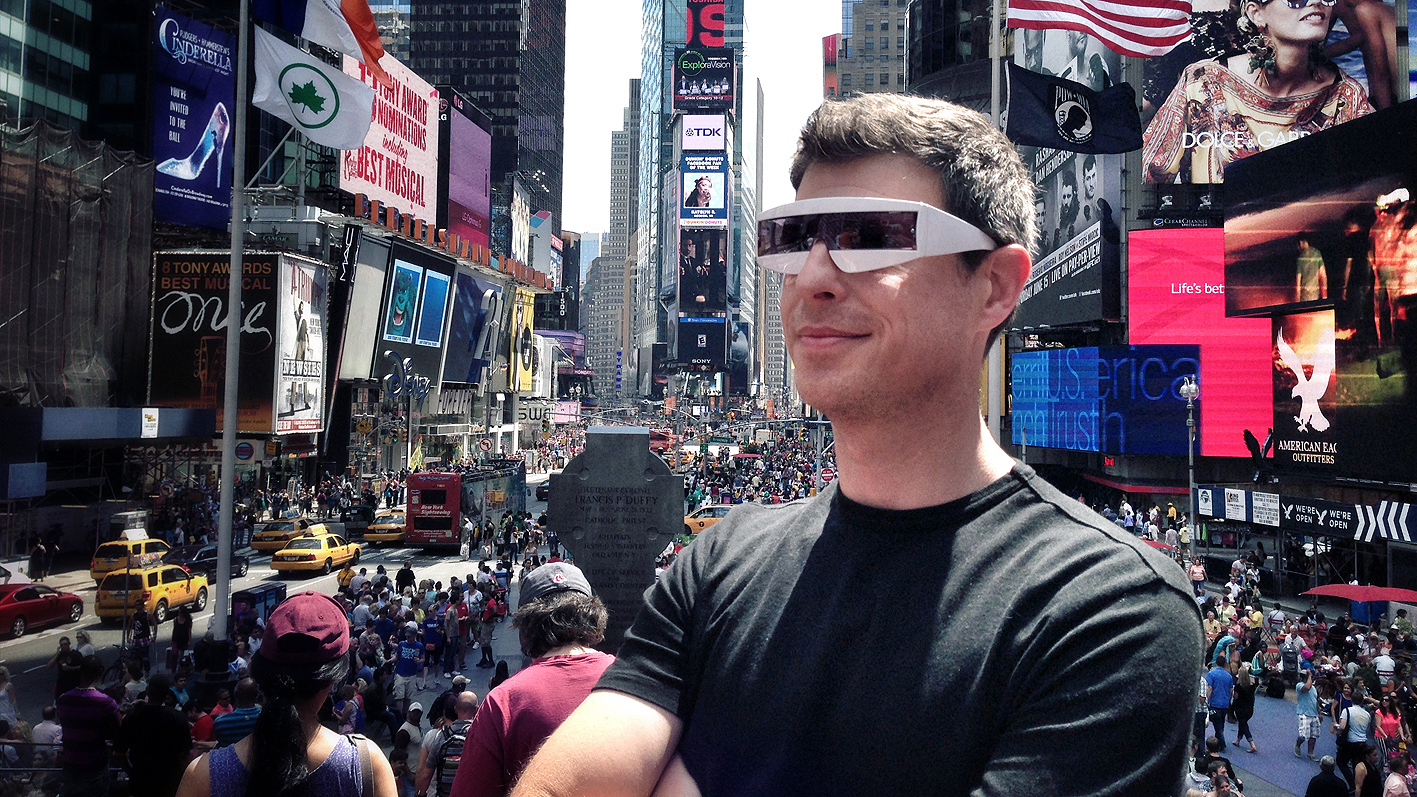
Hands up who thinks I look an idiot (comments restricted to the head gear please). Raise your hands if you think I’m spying on you. And finally, who wants a go on my new Google Glass?

DJ_Glass.jpg

I think we’ve already established my fondness for cars, design and technology. This new toy sits firmly in the third category and stretches my propensity for rabid gadget adoption to new limits. I love the thought of taking information away from a screen and delivering it as close to the brain as possible, however I’m not a fan of looking daft.

It’s this healthy skepticism that helped me through the door at Google’s New York office last week when I collected my shiny new Glass headset. Or should I say attempted to collect, more on that later.

If you don’t already know what Google Glass is (and I keep forgetting there are some of you who don’t) this is the Palo Alto tech giant’s first foray into wearable technology. 

Essentially, a metal bar runs around the user’s brow line from ear to ear, balancing on their nose. An additional arm reaches round the right side where a prism projects digital content directly onto the retina of the eye so both foreground and distant images remain in focus and the multitasking begins. This grey, black, white, blue or red arm also contains the speaker where the audio is transmitted directly into the wearer’s skull through bone-conduction. It’s not as freaky as it sounds and effectively leaves you with both ears to function normally without the ambient audio barrier headphones create.

That’s the tech, so what’s the experience? The screen image is almost unnaturally sharp and it comes as a shock when both the digital information and the world around you are in focus. The headset is very light and to someone who doesn’t usually wear glasses such as myself, it feels pretty unobtrusive.

When the headset is asleep, the screen remains completely clear and only when the touch-sensitive panel on the screen arm is tapped does the content spring into life. Next steps require the wearer to utter the magic words “OK Glass” to activate voice control or swipe back, down or forwards with one or two-fingered gestures on the screen arm. Still with me?

You can also nod your head up and down to deactivate the headset or go directly to the camera mode by pressing a physical button near the screen.

All this takes some getting use to but becomes increasingly addictive as you discover more features such as the ability to ask Glass for a local restaurant, then receive screen navigation direct to the door. Or how about a live Google hangout with your screen view transmitted to your invited circles? Maybe flight information beamed directly to your screen with Glass having drawn the information from your airline’s email confirmation?

That last point is actually impressive and unnerving in equal measures. The level of ‘data sharing’ hits home when you realise HAL has started reading your private correspondence.

At this juncture I’d like to explain why I’m not wearing a conventional pair of Google Glass in the photo above. I’m English.

It seems that’s the only reason. I was selected for the #ifihadglass programme via a twitter conversation instigated by Google, asking how we’d use Glass in interesting and innovative ways. Only a few of us were fortunate enough to receive the single acknowledging Tweet that said we’d been selected to participate in this groundbreaking research into the future of wearable technology (and it would cost us $1,500 each – a small price to pay in the grand scheme of things).

A wall of silence followed, during which time the first ‘I/O 2012’ conference attendees received their headsets (more commonly known as Glass Explorers, or the unofficial title, Glassholes). The press got to review this kit by spending time with these early adopters, who subsequently became tech/geek superheroes.

The silence persisted and my anxiety grew so I began to harass everyone I knew at Google (or were in any way connected to the organisation) to see if I could learn of the schedule for issuing Glass. I apologise now to all those nudged but the radio silence lead to doubts that I had actually been selected.

I needn’t have worried as the message finally appeared on my iPhone to tell me that @projectglass had followed me and a DM arrived “Your Glass is now ready! Please purchase within 14 days.” and I should head to a designated website to book my dedicated one-to-one introduction to Glass. This was it, I could organise my US trip to collect my headset!

With my US address supplied (Brandwidth’s New York office) and $1,500 paid in full (via my colleague’s US-registered credit card – thanks Dacia!) I was finally in the system with my designated time and destination set. Google New York here I come!

On the basis of this momentous occasion, I arranged a coast-to-coast US tour, taking in meetings in San Francisco, Cupertino, Mountain View, LA, Washington and New York – all in one fast-paced week, culminating in my appointment at the funky Google New York office.

Upon arrival I was escorted upstairs by a Glass-wearing brand ambassador, my first human contact throughout the whole process. I presented my passport as proof of ID at the reception desk and was issued with my Glass pass and whisked into the inner sanctum.

The one-to-one session began with the opportunity to try all Glass colour (or color) options, with and without the sunglass attachment. This was a pleasant surprise as I had assumed my selection would be set in stone the moment I had completed my online purchase. Both blue and red suggested I was trying too hard and looked more than a little like Timmy Mallet or Jonathan King – not a good look. The black looked a little heavy when not accompanied by the sunglasses. The white looks great but too clinical. I stuck with the neutral grey I had chosen on my original order.

I was logged into a Google Chromebook (the first time I had seen one in the wild), my headset registered and synced with G+ and GMail accounts and I was in the system! A two hour induction and training session followed during which I explained I intended to make a charity wing-walk wearing my new Glass, amongst other death-defying feats to entertain, reward and probably annoy my digital audience in equal measures.

Then my Glass world came crashing down as another cheerful Google employee asked if I was a resident of the United States? “No” I replied “but I do spend a lot of my time here, test and review emerging technology, build content for these devices and make recommendations to global clients. And was chosen by Google to be here”.

“Oh, but you’re English”

“Yep”

“I’m sorry but we can’t let you leave as this is only open to US residents”

“But that doesn’t make any sense for a beta programme looking to obtain as much feedback as possible from a varied global audience”

“I’m sorry but we can’t let you leave as this is only open to US residents”

“Can I not try to run out with them? I’ve paid for them and still own them?”

“I’m sorry but we can’t let you leave as this is only open to US residents”

I left, without shouting at the well-intentioned Google staff and walked 66 blocks in 30º heat to get the frustrating situation out of my system.

Had I made a run for it and actually made it as far as the sidewalk, my first public outing wearing my Glass headset would probably have been akin to wearing only an oversized pair of Dame Edna specs and my pants (that’s underwear for the Americans, not trousers). In New York, these anxiety levels may well have proven unfounded as the US crowds are more accepting of the technology – especially in cosmopolitan New York. Might have been quite different on the streets of London.

I’m still intrigued to see how Glass evolves and how the human element is represented. There certainly wasn’t much human interaction in the run up to my Google visit!

Although much of the focus surrounding Glass is on generating images and video footage that gives a first-person perspective, I’m concerned we’re beginning to see a removal of character rather than adding personality. Transmitting or recording ‘my viewpoint’ never actually features the wearer so we’re actually one step removed rather than making a connection. Either way, this still generates interesting content but we shouldn’t lose sight of the individual.

Am I disappointed? You bet your ass I am, even if the number of individuals lucky enough to be accepted onto the beta programme (as I was) are very small, I’m willing to bet I’m in a category of 1 when it comes to those that have owned Glass only to be parted from them for being a little too English.


tags: Google, Google Glass, Glass, Glass Explorer, #ifihadglass, New York, Wearable tech
categories: Futurology, Gadget, Innovation, Mobile technology
Monday 06.17.13
Posted by Dean Johnson
Comments: 1
 
Newer / Older

Designing the Future